


【教學/常見問與答】Raspbian (2015-01-31) 在 Pi 2 的 RPi.GPIO 問題
Last Updated on 2022 年 9 月 10 日 by 小編
問題描述
2015-01-31 釋出的 Raspbian 在 Pi 2 呼叫 RPi.GPIO 模組會出現 RuntimeError: This module can only be run on a Raspberry Pi! 錯誤訊息。
情境複製
假設我們寫一個可以控制 LED 一明一滅的 python 程式。範例來自 用 Raspberry Pi 學 GPIO – 自己做遊戲機。線路圖如下:
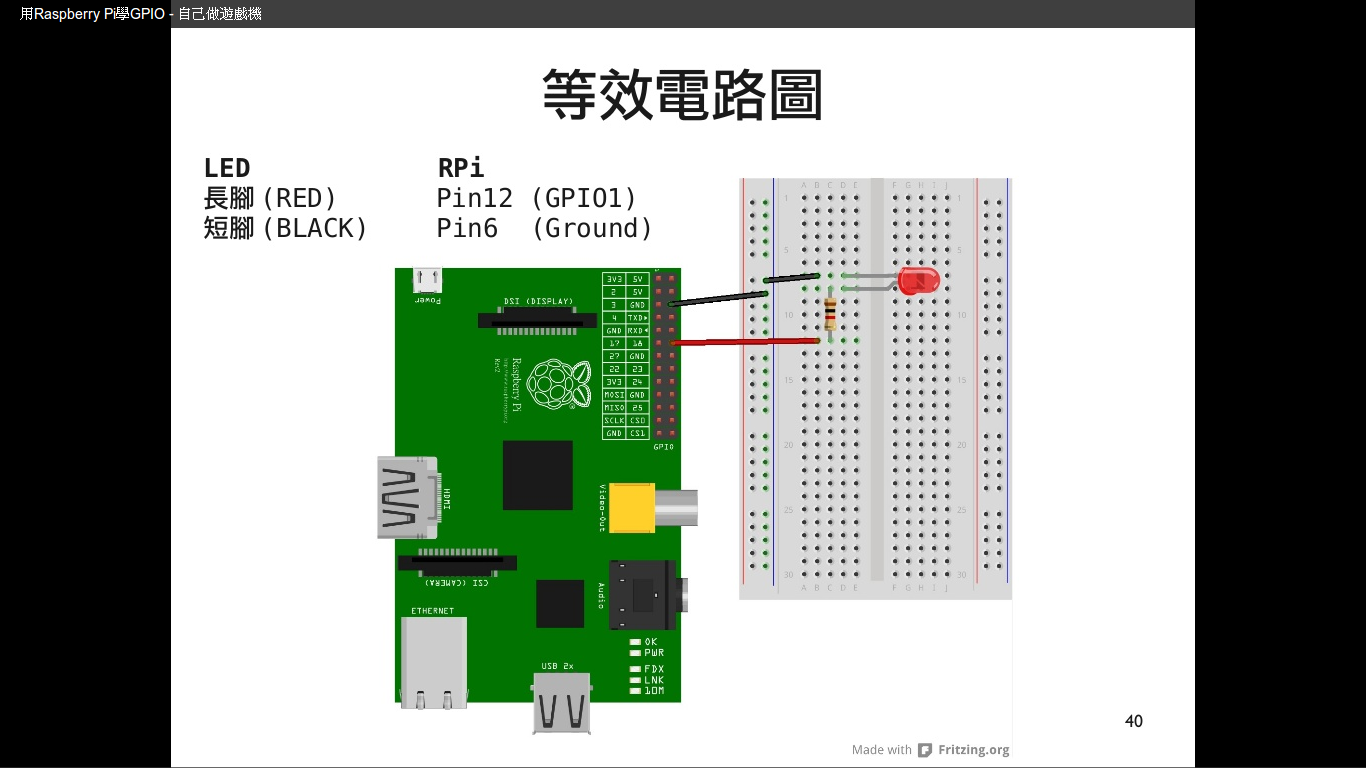
程式碼範如 led_blink.py:
import RPi.GPIO as GPIO
import time

LED_PIN = 12
GPIO.setmode(GPIO.BOARD)
GPIO.setup(LED_PIN, GPIO.OUT)

try:
    while True:
        print("LED is on")
        GPIO.output(LED_PIN, GPIO.HIGH)
        time.sleep(1)
        print("LED is off")
        GPIO.output(LED_PIN, GPIO.LOW)
        time.sleep(1)

except KeyboardInterrupt:
    print "Exception: KeyboardInterrupt"

finally:
    GPIO.cleanup()
如果在 Raspberry Pi 2 (2015-01-31 版本)執行這段程式碼會出現以下訊息:
pi@raspberrypi ~ $ sudo python led_blink.py
Traceback (most recent call last):
  File "led_blink.py", line 1, in
    import RPi.GPIO as GPIO
RuntimeError: This module can only be run on a Raspberry Pi!
看起來是沒有 RPi.GPIO 的模組。所以我們用 sudo pip install RPi.GPIO 指令安裝 RPi.GPIO 模組看看。
pi@raspberrypi ~ $  sudo pip install RPi.GPIO
Requirement already satisfied (use --upgrade to upgrade): RPi.GPIO in /usr/lib/python2.7/dist-packages
Cleaning up...
解決方案
原來是要升級模組才行。我們要使用 sudo pip install --upgrade RPi.GPIO 指令。
pi@raspberrypi ~ $ sudo pip install --upgrade RPi.GPIO
Downloading/unpacking RPi.GPIO from https://pypi.python.org/packages/source/R/RPi.GPIO/RPi.GPIO-0.5.11.tar.gz#md5=9dc3dab6ce2b7ccb833a866efb392821
  Downloading RPi.GPIO-0.5.11.tar.gz
  Running setup.py egg_info for package RPi.GPIO

Installing collected packages: RPi.GPIO
  Found existing installation: RPi.GPIO 0.5.9
    Uninstalling RPi.GPIO:
      Successfully uninstalled RPi.GPIO
  Running setup.py install for RPi.GPIO
    building 'RPi.GPIO' extension
    gcc -pthread -fno-strict-aliasing -DNDEBUG -g -fwrapv -O2 -Wall -Wstrict-prototypes -fPIC -I/usr/include/python2.7 -c source/py_gpio.c -o build/temp.linux-armv7l-2.7/source/py_gpio.o
    gcc -pthread -fno-strict-aliasing -DNDEBUG -g -fwrapv -O2 -Wall -Wstrict-prototypes -fPIC -I/usr/include/python2.7 -c source/c_gpio.c -o build/temp.linux-armv7l-2.7/source/c_gpio.o
    gcc -pthread -fno-strict-aliasing -DNDEBUG -g -fwrapv -O2 -Wall -Wstrict-prototypes -fPIC -I/usr/include/python2.7 -c source/cpuinfo.c -o build/temp.linux-armv7l-2.7/source/cpuinfo.o
    gcc -pthread -fno-strict-aliasing -DNDEBUG -g -fwrapv -O2 -Wall -Wstrict-prototypes -fPIC -I/usr/include/python2.7 -c source/event_gpio.c -o build/temp.linux-armv7l-2.7/source/event_gpio.o
    gcc -pthread -fno-strict-aliasing -DNDEBUG -g -fwrapv -O2 -Wall -Wstrict-prototypes -fPIC -I/usr/include/python2.7 -c source/soft_pwm.c -o build/temp.linux-armv7l-2.7/source/soft_pwm.o
    gcc -pthread -fno-strict-aliasing -DNDEBUG -g -fwrapv -O2 -Wall -Wstrict-prototypes -fPIC -I/usr/include/python2.7 -c source/py_pwm.c -o build/temp.linux-armv7l-2.7/source/py_pwm.o
    gcc -pthread -fno-strict-aliasing -DNDEBUG -g -fwrapv -O2 -Wall -Wstrict-prototypes -fPIC -I/usr/include/python2.7 -c source/common.c -o build/temp.linux-armv7l-2.7/source/common.o
    gcc -pthread -fno-strict-aliasing -DNDEBUG -g -fwrapv -O2 -Wall -Wstrict-prototypes -fPIC -I/usr/include/python2.7 -c source/constants.c -o build/temp.linux-armv7l-2.7/source/constants.o
    gcc -pthread -shared -Wl,-O1 -Wl,-Bsymbolic-functions -Wl,-z,relro build/temp.linux-armv7l-2.7/source/py_gpio.o build/temp.linux-armv7l-2.7/source/c_gpio.o build/temp.linux-armv7l-2.7/source/cpuinfo.o build/temp.linux-armv7l-2.7/source/event_gpio.o build/temp.linux-armv7l-2.7/source/soft_pwm.o build/temp.linux-armv7l-2.7/source/py_pwm.o build/temp.linux-armv7l-2.7/source/common.o build/temp.linux-armv7l-2.7/source/constants.o -o build/lib.linux-armv7l-2.7/RPi/GPIO.so

Successfully installed RPi.GPIO
Cleaning up...
再次執行,沒問題了。
發佈留言